
Flight × software / Live project
Condor Flight Lab
Turning simulator telemetry into something you can see, understand, and learn from.
Independent product and engineering project
- The problem
- Simulator telemetry needs context before it becomes a useful display or debrief.
- What I’m building
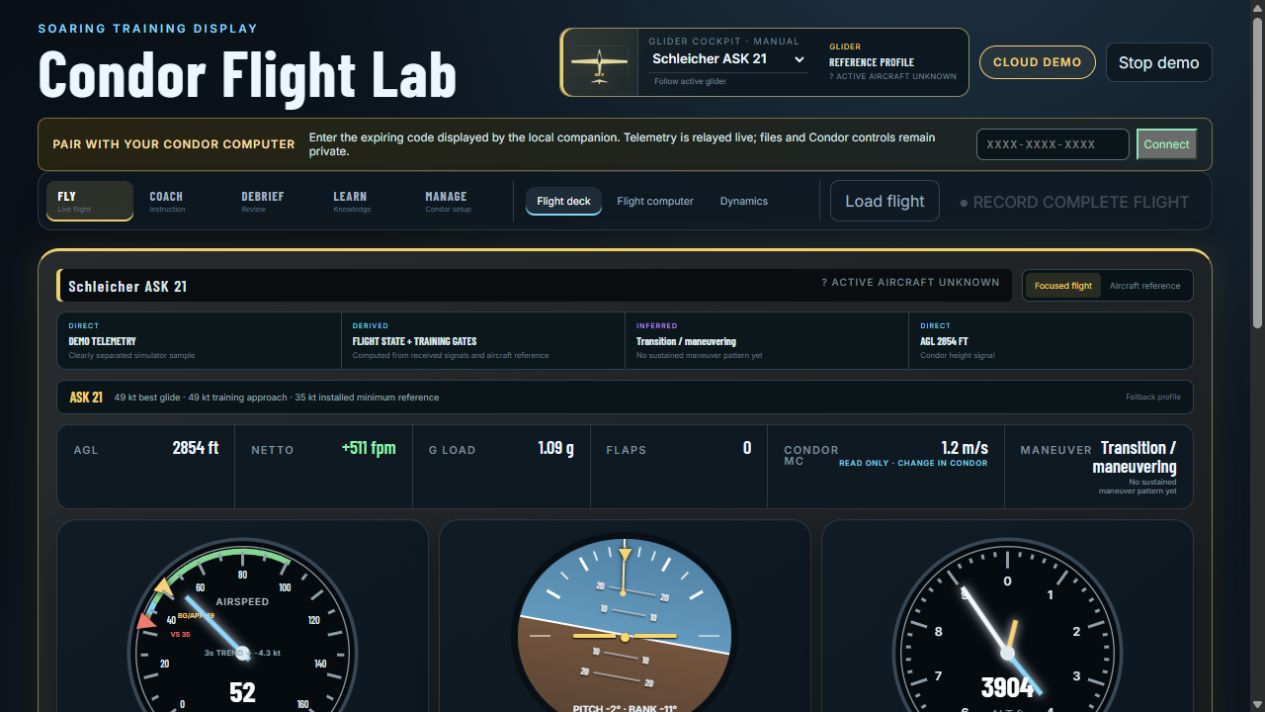
- TypeScript and React, a local simulator companion and cloud viewer, UDP telemetry, WebSockets, recording, coaching, and debrief. The display distinguishes received signals from computed state and inferred cues.
- Try it today
- A labeled cloud demo and a pairing flow for the local companion. Visitors can explore the demo without a connected simulator.
Flying gives me questions. Building gives me a way to explore them.
Condor Flight Lab brings simulator flight information into a dedicated display, with spaces for live flight, instruction, debrief, knowledge, and setup.
The public viewer includes a labeled cloud demo and a pairing flow for the local Condor companion. It separates received signals, computed flight state, and inferred cues so the display can show where a conclusion comes from.
This is simulator software. The engineering challenge is making complicated information legible without pretending that a screen replaces an instructor.
← All projectsInside the thinking
The choices behind the work.
Make the evidence visible.
Distinguish received signals, computed flight state, and inferred cues. A useful flight display should help someone understand where an interpretation comes from.
Connect two different environments.
The local companion works alongside Condor; the cloud viewer offers a pairing flow and a labeled demo. The interface gives visitors a way to explore before connecting their simulator.
Think beyond the live display.
Live flight, instruction, debrief, knowledge, and setup have different jobs. The product gives each a place, with the instructor remaining central to real training.
Take a closer look
Follow the curiosity.
Open the public viewer and explore the labeled cloud demo. You can see the display without a connected simulator; live telemetry uses the local companion.